TMA1 v2: Making the Agent Loop actually loop
Table of Contents
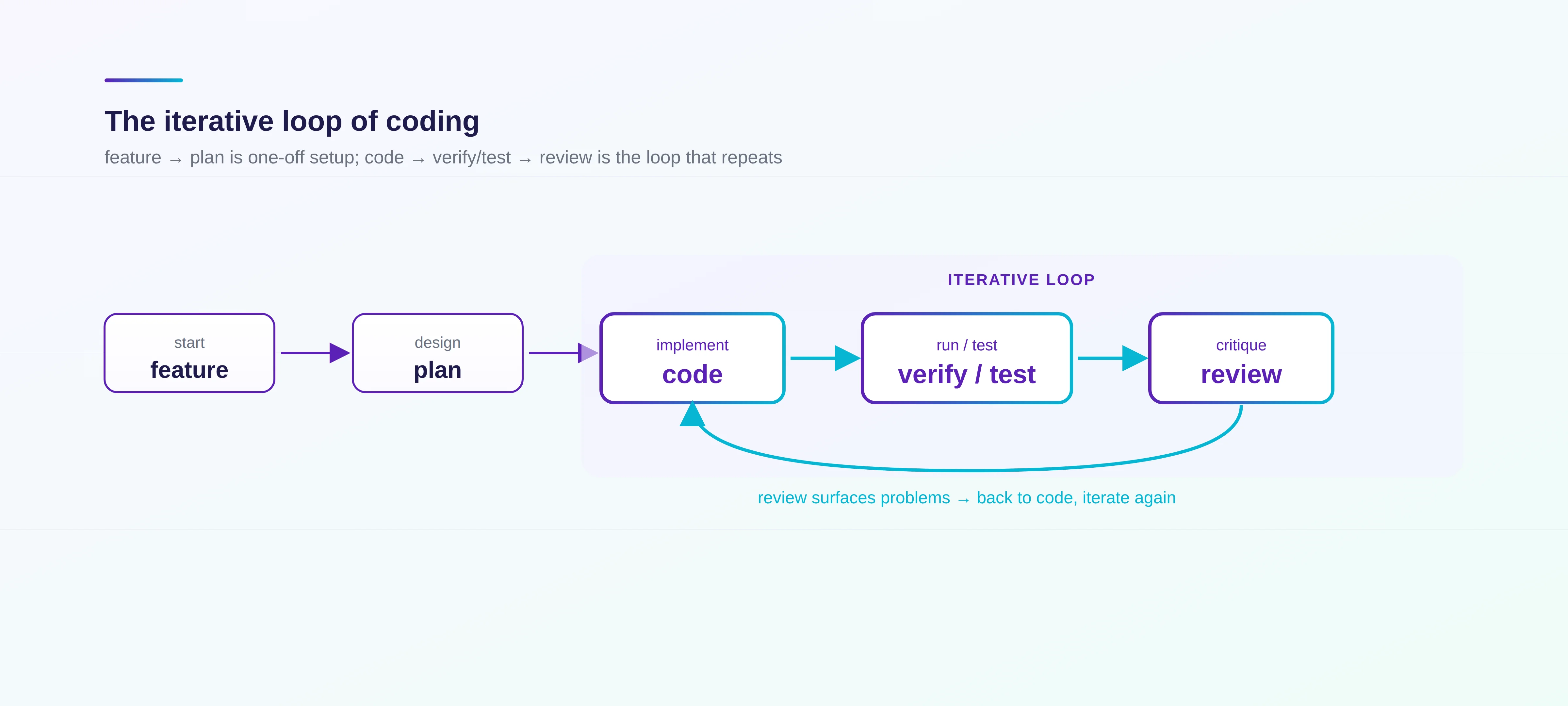
TMA1 v2 adds an MCP server, enhanced hooks that auto-inject build/session/anomaly context, and cross-agent context sharing between Claude Code and Codex. I’ve written about TMA1 before — a fully local observability tool for coding agents, with a built-in dashboard for sessions, tool calls, LLM calls, cost, and anomalies. I haven’t done any marketing for it, but it’s quietly picked up 80+ stars and a few hundred installs. After running v1 every day for a while, I started bumping into things it couldn’t help me with. The first is communication between agents. My usual setup is Claude Code doing plan, coding, and testing, with Codex doing plan and code review. They interact a lot, but there’s no easy way to share session state or context between them, interactive or headless. I’ve tried some group-chat-style agent collaboration tools, but group chat doesn’t fit coding — partly the API cost, partly all the filler chatter. Coding work is actually pretty focused. It’s plan, code, verify/test, review, in a tight loop: Review usually happens after verify/test: get the code and tests running first, then come back and judge the implementation. If it’s not good enough, edit, re-verify, re-review. What I wanted was for those steps to flow more smoothly between agents, by feeding the necessary context across so each agent can see exactly what the other just did. The second is build-state synchronization. I wanted build context to be injected between every prompt and tool call: pass/fail status, error logs, environment changes (external tools or other agents touching files), all of it, automatically. There’s a small detail worth mentioning here. When fsnotify sees a file change, how do you decide if it was you or the agent? The trick is to look at hook events in a ±5 second window. First, check for an Edit/Write/MultiEdit with a matching When certain patterns show up, TMA1 should also nudge the agent to change strategy. For example: Put simply, I wanted to make the observe step of the Agent Loop a lot stronger. Not just observe, but feed the observations back as context, automatically. That’s what lets the agent do better work, and cuts down on manual babysitting. That’s what TMA1 v2 is. On top of v1’s deep observation of Codex, Claude Code, Copilot CLI, and any OTel GenAI–compatible agent, v2 adds: That covers the current session, recently touched files, which tools were used, the last build command and its result, files changed externally (by a human or another agent), and any anomaly detections. It nudges the agent to notice context changes and suggests what to do. Codex can pick up from there and do further review or coding. A few things I want to add next: I’ve been using all of this on my own projects, and the difference is real: fewer pointless manual context syncs between agents, fewer of those “the agent kept doing the wrong thing” moments. Try it out. The easiest way is to paste this into your agent: Or install manually: For Codex, swap That installs TMA1 globally. To wire MCP and hooks into a specific project, run this from the project root: If you run build commands outside the agent, you can pipe their context to the coding agent with: For example, It’s still pretty early. Feedback and PRs both welcome.
feature → plan → code → verify/test → review
                   ↑____________________↓
file_path. If nothing matches, fall back to looking for Bash commands whose input contains the file’s basename (this catches things like mkdir, rm, git checkout xxx.go that don’t carry a file_path field). If neither matches, attribute it to “human”. Better to wrongly blame yourself than let the agent off the hook.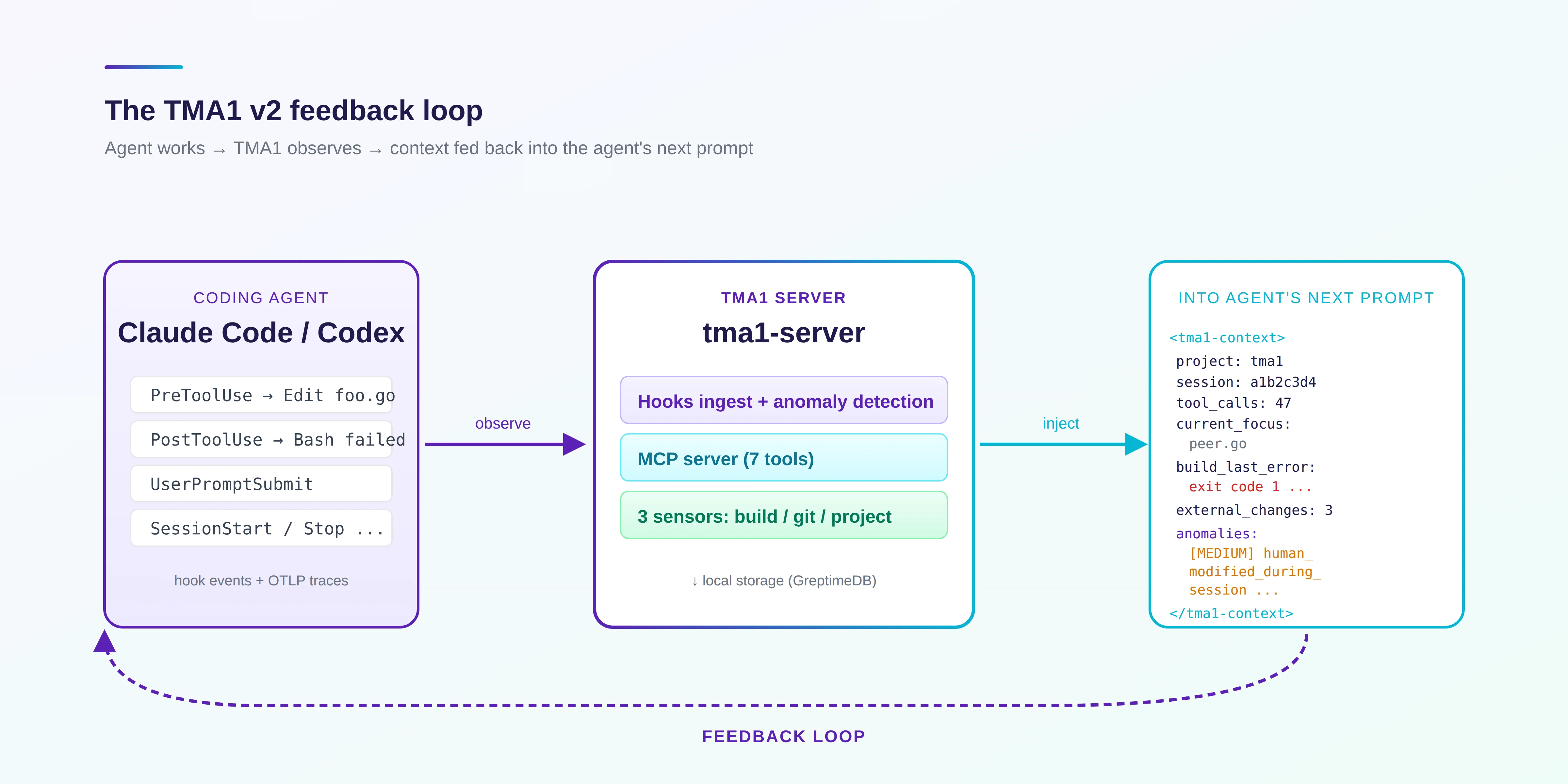
<tma1-context> block on UserPromptSubmit, PostToolUse, SessionStart, Stop, PreCompact, and so on. Something like:<tma1-context>
project: tma1
session: a1b2c3d4
duration: 12 min
tool_calls: 47
tokens: in=84210 out=312045
current_focus: .../internal/perception/peer.go
tools: Bash×18, Edit×12, Read×9, TaskUpdate×4
recent_files: .../perception/peer.go, .../mcp/tools.go, .../hooks/install_cc.go
build: make (running)
build_last_error (6m ago, may have recovered): exit code 1 ...
external_human_changes: 3
external_files: .../path/to/file.go
anomalies:
- [MEDIUM] human_modified_during_session — Re-read the listed files before assuming your in-memory copy is current.
</tma1-context>
tma1-peer skill and slash command (CC only). For example, pulling Claude Code’s recent code review from inside Codex:› /tma1-peer cc 1
• SessionStart hook (completed)
hook context: <tma1-context>project: tma1build: npm (running)</tma1-context>
• Using tma1-peer: read the most recent Claude Code session and look at the context it left in this project.
• Called tma1.get_peer_sessions({"agent_source":"claude_code","limit":1,"message_limit":30})
└ {"agent_filter": "claude_code", "count": 1, "most_recent_session": {"agent_source": "claude_code", "last_activity": "2026-05-23T13:07:32.627-07:00", "last_activity_ago": "1m ago", "session_id": "4161a98b-e280-
4362-bab3-77081d391691"}, "project": "/Users/dennis/programming/go/tma1", "sessions": [{"session_id": "4161a98b-e280-4362-bab3-77081d391691", "agent_source": "claude_code", "started_at": "2026-05-
23T12:46:53.826-07:00", "last_activity_at": "2026-05-23T13:07:32.627-07:00", "last_activity_ago": "1m ago", "duration_minutes": 20, "tool_call_count": 158, "tokens_input": 80, "tokens_output": 144882,
"cwd": "/Users/dennis/programming/go/tma1/server/server", "messages": [{"ts": "2026-05-23T13:05:28.488-07:00", "role": "user", "message_type": "tool_result", "content": "bfs: error: internal/handler: No
such file or directory.\n---\nugrep: warning: internal/handler/: No such file or directory"}, {"ts": "2026-05-23T13:05:28.489-07:00", "role": "assistant", "message_type": "tool_use", "content":
"{\"command\":\"cd server && ls interna...
──────────────────────────────────────────────────────────────────────────────────────────────────────────────────────────────────────────────────────────────────────────────────────────────────────────────────────
• Claude Code left a v2 agent loop audit a minute ago, session in /Users/dennis/programming/go/tma1/server/server. Main finding: fix 4 P0 issues first.
1. server/internal/mcp/server.go: tool goroutines have no recover(), a panic will crash the whole MCP server.
2. server/internal/perception/external.go: query errors are silently swallowed, a GreptimeDB hiccup gets misread as "no external changes".
3. server/internal/perception/file_writer.go: os.WriteFile writes .tma1-context.md non-atomically, agents can read a half-written file.
4. server/internal/handler/hooks.go: generateInjection silently returns empty on unknown hook events, no logging.
Also suggested:
- server/internal/greptimedb/schema_migrations.go: recordMigration should use sqlutil.Escape instead of hand-rolled strings.ReplaceAll.
- Clean up a batch of comments that just restate the code.
- MCP stdout slow-consumer deadlock needs its own design, Claude flagged it for the next round.
Claude touched / reviewed a fair number of files. Key ones: server/internal/mcp/server.go, server/internal/perception/external.go, server/internal/perception/file_writer.go, server/internal/handler/hooks.go, server/internal/
greptimedb/schema_migrations.go.
@codex message syntax.Read https://tma1.ai/SKILL.md and follow the instructions to install or upgrade TMA1 for your AI agent
curl -fsSL https://tma1.ai/install.sh | TMA1_ADAPTER=claude-code bash
TMA1_ADAPTER to codex. Add ~/.tma1/bin/tma1 to your PATH while you’re at it.tma1 install --adapter claude-code
tma1 build --watch -- <build cmd>
tma1 build --watch -- npm run dev.References